
Create custom error pages
Custom error pages are easy to manage in Quant, whether in traditional CDN or static delivery modes.
Note: The content of error pages may be cached for up to 5 minutes. Please allow time for changes to display.
Custom error pages (CDN / Proxy mode)
Section titled “Custom error pages (CDN / Proxy mode)”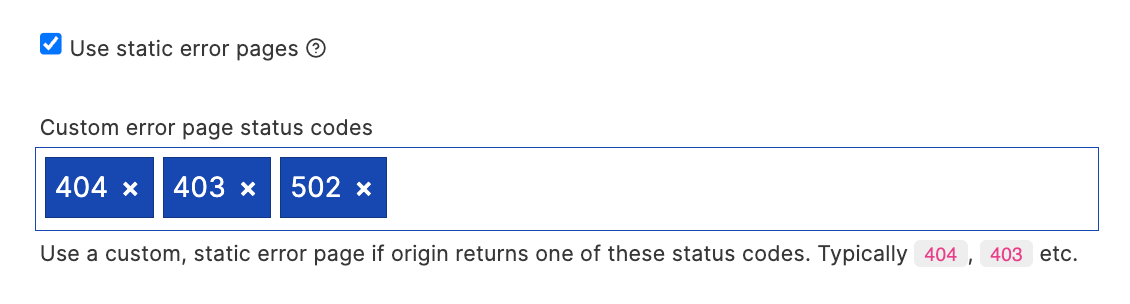
In your Page Rule responsible for proxying content enable the “Use static error pages” option, and provide a list of status codes you wish to enable custom error pages for.
For each of the status codes, you can provide custom page content as per the instructions below for static / Jamstack error pages.
These pages should be saved to a route in the format: _quant[STATUS_CODE], for example:
- 404:
_quant404 - 403:
_quant403 - 502:
_quant502
Custom 404 error pages (static / Jamstack)
Section titled “Custom 404 error pages (static / Jamstack)”Custom error pages are easy with Quant. Any content pushed to QuantCDN with the special /_quant404 route will become the active 404 page.
Create via the Quant Dashboard
Section titled “Create via the Quant Dashboard”You can create custom 404 content directly via the Quant Dashboard using the WYSIWYG or Code editors. Remember to save under the special _quant404 route.
WordPress
Section titled “WordPress”- Set the 404 page in QuantCDN settings (Settings > QuantCDN) - for example
/path/to/404-page. - Ensure the 404 page is pushed into Quant (Batches > Custom routes and 404 page)
- From now on any change to the 404 page content will automatically update the 404 error page in QuantCDN
Drupal
Section titled “Drupal”- Ensure the 404 configuration is set in Drupal (Configuration > Site Information > Default 404 page)
- When the node is updated or a seed takes places the 404 page will be updated
Quant Studio
Section titled “Quant Studio”Studio’s Build & Publish (Quant Builder, see Deployments) handles this for you. If your project has a 404 page — for an Astro
project that means src/pages/404.astro — the builder copies the rendered page
to the _quant404 route on every publish, and QuantCDN serves it. There is no
setting to enable and nothing to configure.
The source route defaults to /404, which is the conventional location for
every static site generator Studio supports.
If a published site still shows the generic Quant error page, check in this order:
- Does the project build a 404 at all? No
404page means no_quant404route. This is by design — nothing is invented for you. - Has the site been published since the page was added? The route is written during a build, so it appears on the next publish, not before.
- Remember the cache. Error page content may be cached for up to five minutes.
To confirm a site is serving its own error page, request a path that does not exist and look for your own content rather than Quant’s:
curl -s https://your-site.example.com/a-path-that-does-not-exist | headIf you maintain your own page at _quant404 — by pushing it directly, or via
the Dashboard editors above — Studio leaves it alone and never overwrites it.
Static Generators (Quant CLI)
Section titled “Static Generators (Quant CLI)”Ensure you have content under the /_quant404 path (for example,
/_quant404/index.html) before running quant deploy. The CLI walks your
output directory and derives each route from its file path, which is why the
page is described here as a file rather than as a route.
A generator’s own 404.html is not special: it is published at /404.html and is not used as the 404 page. Copy it into place in your build step, before the deploy:
mkdir -p dist/_quant404 && cp dist/404.html dist/_quant404/index.htmlIf you created _quant404 in the Dashboard and it is not in your build directory, the next quant deploy unpublishes it. Include it in the build, or keep it with --skip-unpublish-regex '_quant404'.
This step is needed whenever you deploy the CLI or a GitHub workflow, including a Studio site that deploys through its workflow. Only a site published with Studio’s Build & Publish gets the route written for it — see above.
Custom WAF error pages
Section titled “Custom WAF error pages”WAF error pages can be controlled in the same way as the static / Jamstack approach. The following error pages are supported:
_quant_waf_403: Override the default WAF block (403 Status) error page_quant_waf_429: Override the default rate limiting (429 Status) error page